Microsoft is finally phasing out the File Explorer properties dialog box that has been used for decades, replacing it with a brand new version based on WinUI 3. This is part of Microsoft’s optimization efforts to improve the performance and stability of Windows 11.
It was noted that, thanks to all the WebView2 user interface components, Windows 11 looks extremely simple and modern, but a little digging into the system’s underlying layers reveals that old-fashioned traditional interfaces are still everywhere.
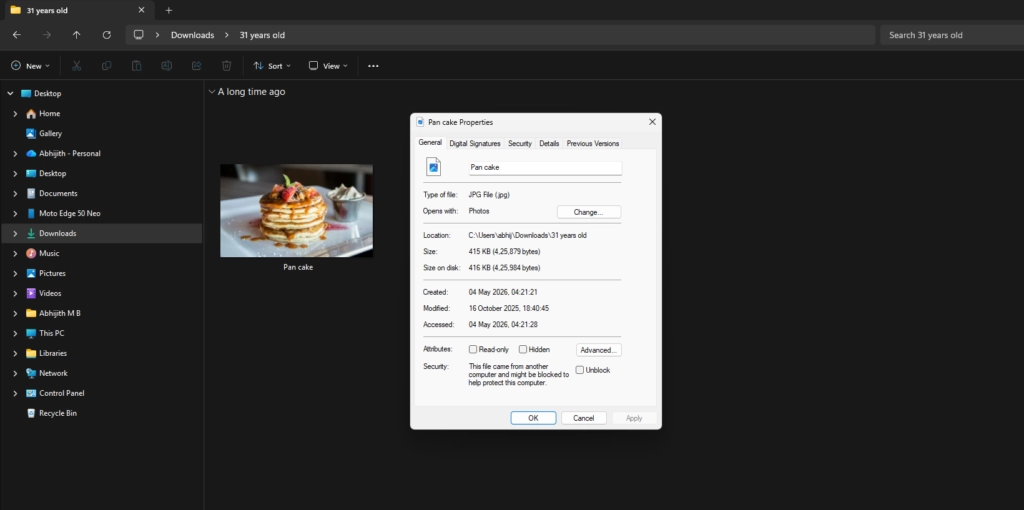
One of the most obvious examples is in File Explorer. Although the application now supports tabs, a brand-new, modern address bar, and a sleek, minimalist gallery view, the pop-up interface when you right-click a file and select Properties instantly brings back memories of the Windows 95 era.
If you’re used to using Windows 11 in dark mode, the old-fashioned properties dialog box’s glaring white background was practically like a flashbang. Now, Microsoft has finally started working on a solution.
According to recent discoveries about the Windows 11 preview system, the tech giant is fully developing a completely modernized file properties dialog box based on WinUI 3.
This discovery comes from well-known Windows news leaker phantomofearth. After analyzing the latest preview version of the system code, he found that several new text strings related to “deleted file attributes” had been added to the resources.pri file of the modernized file explorer framework file MicrosoftWindows.Client.FileExp.
The key point is that these newly added strings are exactly the same as the text in the existing old deleted file properties dialog box. Microsoft’s proactive migration of this proprietary text to the new File Explorer resource pack essentially confirms that the old properties dialog box will eventually be replaced.
To further clarify the impact of this change on the system, tech media outlet Windows Latest sought more details from phantomofearth. When asked if the new WinUI 3 dialog box was basically finalized and about to be released, phantomofearth confirmed that the official plan is indeed to release this modernized file properties dialog box based on WinUI 3.
He explained, “When I tweeted, it was just a reasonable speculation, but I would be very surprised if the final version is not WinUI 3. Since the modern components of File Explorer—the address bar, search box, command bar, details panel, home page, and gallery—already use WinUI 3, it would be completely illogical to switch to another technical architecture.”
He also offered a very convincing perspective from the core development logic: “If Microsoft doesn’t have plans to refactor and modernize the properties dialog box, there’s absolutely no need to add the relevant text strings to the new version of the File Explorer component.”
This finally answers a question that has puzzled many experienced users for years: Why does the properties dialog box in File Explorer never support dark mode?
While other older system components in Windows 11 have been adapted to dark mode or undergone visual updates, the properties menu stubbornly retains its pure white background. As phantomofearth pointed out, since the entire properties dialog component is planned to be replaced by the native WinUI 3 version, Microsoft has no need to waste development effort to additionally adapt the properties dialog for the old Win32 architecture to dark mode.
Windows Latest had previously confirmed that Microsoft was gradually replacing Windows 8-style interface elements left over from Windows 11. Microsoft’s proactive migration of related text to a modern framework is sufficient proof that the company has finally begun a thorough cleanup of legacy components.
Based on WinUI 3, the modernized properties dialog box can be restructured and dismantled, which is currently a messy and mixed code architecture that drags down the performance of File Explorer.
The current file explorer uses the old Win32 framework as its underlying layer, overlaid with modern XAML and WinUI components. This hybrid rendering architecture is the root cause of software lag and white screen flickering when switching pages.
Microsoft is delivering on its promise to optimize Windows 11, with plans to conduct a comprehensive underlying architecture upgrade to File Explorer throughout 2026. The company will continue to steadily improve File Explorer’s performance and gradually introduce more WinUI 3 interface components.
There is no doubt that migrating the old properties dialog box to the native WinUI 3 architecture also aligns with the recent promise made by Marcus Ash, head of the Windows Insider Program: to bring tangible performance, stability, and refined experience optimizations to the system.
Judging from the previous modernization updates to the dialog box, there is reason to expect that the new version of the properties dialog box will also have a smooth and sophisticated modern design style.
This modernized properties dialog box is currently hidden deep within the preview version’s system code, but the relevant resource files have been configured, meaning that official internal testing is not far off. Later this year, it will likely be pushed out to the Windows Insider testing channel along with other interface optimization features.